
Easypaisa APK should come from Google Play, under the publisher name Easypaisa Bank Limited. Its official Android package is pk.com.telenor.phoenix. Because this app can access a real financial account, APKWala does not host, modify or recommend third-party copies of it.
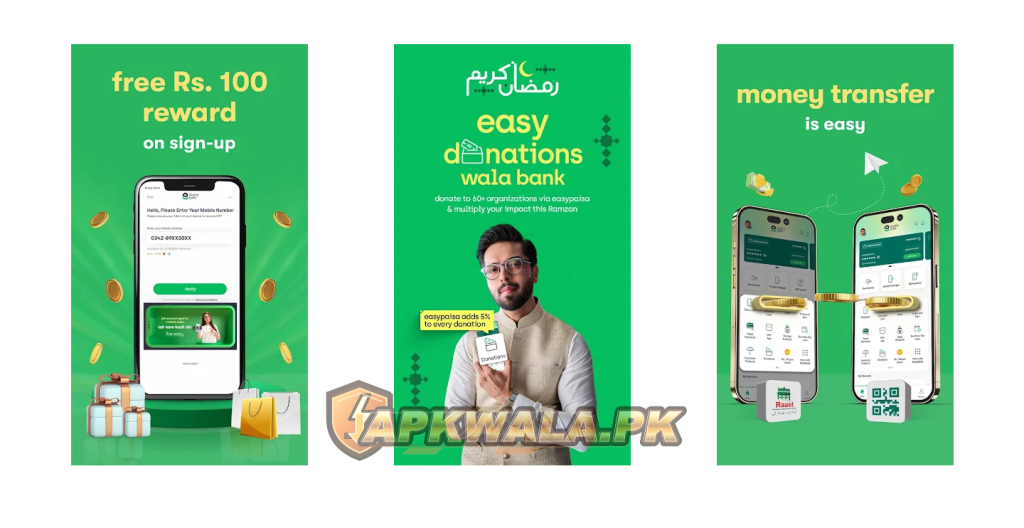
The official Easypaisa APK supports money transfers, bill payments, mobile load, Raast payments and account services in Pakistan. If Google Play is available on your phone, install it there. A random file labelled latest APK, old version or premium is not a sensible workaround for a login or compatibility problem.
Easypaisa APK information
| App detail | Verified information |
|---|---|
| App name | easypaisa, a digital bank |
| Category | Digital wallet and banking |
| Official publisher | Easypaisa Bank Limited |
| Android package | pk.com.telenor.phoenix |
| Latest Play update checked | July 6, 2026 |
| Google Play downloads | 100 million+ |
| Content rating | Everyone |
| Country and account use | Pakistan |
| Login requirements | Registered mobile number, OTP and account PIN |
| Official Android source | Google Play |
| Official website | easypaisa.com.pk |
| Modified APK hosted by APKWala | No |
We checked the official Google Play page and Easypaisa support pages on August 5, 2026. The Play listing showed more than 100 million downloads and described its latest changes as security improvements. Store figures and requirements can change.
This is an independent installation and troubleshooting guide. APKWala is not Easypaisa Bank Limited, cannot see your account and cannot reverse a payment. Never post your CNIC, OTP, PIN or account balance in a comment.
You can find other verified local apps in our Pakistan Android apps section.
How to download Easypaisa APK safely
Use Google Play whenever your device supports it. The store verifies the publisher, checks compatibility and delivers the correct build for your phone. Follow these steps:
- Open Google Play and search for easypaisa, a digital bank.
- Check that the publisher is Easypaisa Bank Limited.
- Open About this app and confirm
pk.com.telenor.phoenixin the Play URL or app details. - Tap Install or Update.
- Open the app from the same Play page the first time.
Do not trust the icon alone. A clone can copy a name, green colour and screenshots. The publisher and package are harder checks to fake inside the real Google Play listing.
Is there an official direct APK file?
The verified consumer route we found is Google Play. Easypaisa’s website sends Android users to its store listing rather than presenting a general direct APK archive. That is why this page links to the official listing instead of offering a download button for a re-uploaded financial app.
If a site asks you to disable Play Protect, install a so-called signature fix, enter your OTP on a webpage or grant screen-sharing access, stop. Those instructions are not part of a normal Easypaisa installation.
Our JazzCash APK safety guide follows the same official-only rule for another Pakistani wallet.
What is the Easypaisa latest version?
Google Play does not show one dependable public version number for every Android device. Developers can serve different builds according to Android version, processor, screen or rollout group. A version copied from an APK mirror may therefore be old, device-specific or unrelated to the build Play offers you.
The official listing was updated on July 6, 2026 when checked for this guide. To see what applies to your phone, open the Play listing and look for Update. After installation, you can open Settings > Apps > easypaisa to view the version installed on that device.
Treat pages promising the latest version carefully when they provide no official publisher link or current update date. For a wallet, freshness matters, but provenance matters more. A newer-looking number does not make an unknown file trustworthy.
Can you use an old Easypaisa APK on an old Android phone?
An older build may install on a phone that the current build no longer supports, but it may fail at login, biometric verification or secure network checks. It also misses later security changes. Easypaisa controls the server side, so an installed old app is not guaranteed to remain usable.
Try these safer options first:
- update Android and Google Play system components if the manufacturer still supports the phone;
- clear the Google Play Store cache and check for the app again;
- install the official app on a supported, non-rooted phone you control;
- use Easypaisa’s official USSD option if it is available for your network and required task;
- contact Easypaisa before changing devices or account access methods.
The official FAQ says Telenor customers can dial *786#, while Jazz, Ufone and Zong customers can dial *2262# for supported account use without the app. Menus and availability can change, so follow the prompts and never disclose the resulting PIN or OTP.
An old Easypaisa APK from a mirror is a poor trade: you give an unknown installer access to a phone that may receive money, SMS messages and identity information, yet the old build may still be blocked by Easypaisa.
How to log in to the Easypaisa app
According to the official Easypaisa FAQ, the normal login flow uses your registered mobile number, an automatically fetched OTP and your account PIN.
- Put the SIM registered to your Easypaisa account in the phone.
- Open the official app and enter that mobile number.
- Wait for the OTP verification.
- Enter your Easypaisa account PIN on the app’s PIN screen.
- If this is a new device, complete any additional identity or biometric check shown by the official app.
One Easypaisa account cannot be active on two phones at the same time, according to the official FAQ. A new-device check can therefore appear after changing phones, reinstalling or moving the SIM.
Do not confuse the OTP with your five-digit account PIN. The OTP arrives for a specific verification attempt. Your account PIN is the secret you use for account access and transactions. Easypaisa says not to share either one.
Easypaisa APK OTP not received or not auto-fetching
Give the SMS a minute before requesting another code. Repeated requests can leave several codes in your inbox, and only the newest one may work.
Check the following:
- The entered number matches the SIM registered with the account.
- The SIM has a mobile signal and can receive ordinary SMS messages.
- Airplane mode is off and the correct SIM is active in a dual-SIM phone.
- Easypaisa has the permissions it requests for the login flow.
- The phone’s date and time are set automatically.
- A spam filter or SMS organiser has not hidden the message.
- You are using the official, current app rather than a restored old copy.
You may not need to type the OTP if the official app fetches it automatically. Never forward the SMS, read it to a caller or paste it into WhatsApp. Easypaisa’s official fraud warning says anyone asking for your OTP is attempting fraud.
Roman Urdu: Easypaisa OTP nahi aa raha
Agar Easypaisa OTP nahi aa raha, registered SIM ka signal check karein aur dual-SIM phone mein wohi SIM active rakhein. Number dobara verify karein, phone ka date aur time automatic karein, phir sirf aik naya OTP request karein. OTP kisi caller, retailer, WhatsApp account ya website ko mat dein.
Easypaisa login problem and wrong PIN
First separate an app problem from an account problem. If the app opens but rejects the PIN, reinstalling is unlikely to fix the PIN. If the app crashes before login, updating the app and Android components is more relevant.
The official FAQ says a blocked account can be reactivated by resetting the PIN. It lists *786*8*1# and asks for the 13-digit CNIC number during verification. Follow only the official on-screen or USSD flow. Do not let another person choose or see the new PIN.
If you have an account but never created a PIN, Easypaisa says the app may ask for your mobile number, CNIC and CNIC issuance date, followed by OTP verification and PIN creation. Enter identity details only inside the verified app or an official Easypaisa channel.
Roman Urdu: Easypaisa login nahi ho raha
Agar PIN wrong aa raha hai to app baar baar reinstall na karein. Official PIN reset flow use karein. Agar app open hi nahi hoti, Google Play se update karein, phone restart karein aur cache clear karein. CNIC, PIN aur OTP kisi helper ko screenshot mein bhi na bhejein.
Easypaisa biometric verification not working
Easypaisa supports in-app biometric verification for account upgrades. Its official instructions show users scanning the left hand and then the right hand before submitting account details. This is identity verification, not the same thing as using a fingerprint sensor to unlock the app.
For a failed hand scan:
- clean the camera lens and use bright, even light;
- place the hand against a plain background;
- keep the full hand inside the frame shown by the app;
- remove motion blur by resting the phone or asking a trusted person to hold it without viewing your PIN;
- check camera permission in Android settings;
- turn off beauty filters, overlays and screen dimming tools;
- try a stable Wi-Fi or mobile-data connection.
Do not edit the hand image or use a photo of a hand. If the app repeatedly sends you back to the start, stop retrying for a while and use official support. A device change or NADRA-related verification result cannot be fixed by installing a modified APK.
See the bank’s official in-app biometric guide for the current hand-scanning sequence.
Roman Urdu: biometric verify nahi ho rahi
Camera lens saaf karein, roshni seedhi aur clear rakhein, aur poora haath frame ke andar layein. Camera permission on honi chahiye. Agar scan baar baar fail ho to Mod APK install na karein. Official helpline se account verification ka next step poochein.
Easypaisa app not opening, crashing or stuck on the logo
Start by checking whether Easypaisa has announced maintenance and whether other apps can use the same internet connection. Then work through these steps:
- Force stop Easypaisa and reopen it.
- Restart the phone.
- Update the app from Google Play.
- Update Android System WebView, Chrome and Google Play services if your phone uses them.
- Turn off VPN, Private DNS and screen-overlay tools for one test.
- Open Android app settings and clear cache, not storage.
- Make sure the phone has free storage and automatic date and time.
Clearing storage logs you out and can trigger fresh device verification. Do it only after you know the registered SIM, PIN and recovery details are available. Never use a supposedly fixed APK from a video description to solve a temporary outage.
For broader connection checks, see our Pakistan Android VPN troubleshooting guide.
Easypaisa APK update not installing
If Google Play shows an update but cannot install it, confirm free storage, restart the phone and clear the Play Store cache. Also check for a pending Android system update.
An update can fail if the installed Easypaisa APK came from another source and has a different signature. Android blocks one signer from replacing another signer’s package. Do not use a patched installer to bypass that protection.
If you suspect an unofficial installation:
- Confirm that you know the registered number and can complete account recovery.
- Remove the questionable app.
- Run Google Play Protect and review apps with Accessibility, SMS, notification access or screen-sharing permission.
- Change the Easypaisa PIN through an official channel if it may have been exposed.
- Install the official Play build.
- Review recent transactions and report anything you do not recognise.
Contact Easypaisa promptly if money or credentials may be at risk. APKWala cannot investigate an account transaction.
Rooted phone, cloned app and screen-overlay errors
Financial apps may reject modified operating systems, unlocked security states, app clones, USB debugging setups or overlay tools. The exact checks can change, and bypass instructions would weaken the security around your wallet.
Use the official operating system, remove app-cloning copies, disable screen recorders or floating overlays, and install Easypaisa from Google Play. If the device remains unsupported, use another trusted phone or ask Easypaisa which official access method is available.
Do not install root-hiding modules, patched wallet builds or certificate bypass tools. Even if one opens the app, it can expose your credentials or cause the account to be flagged later.
Scam warning for Easypaisa APK searches
Wallet searches attract clone apps, fake helpline pages and people offering account recovery. A real support agent does not need your OTP or PIN to verify a complaint.
Stop immediately if someone asks you to:
- share an OTP, account PIN or full card details;
- install an APK sent through WhatsApp, Telegram or SMS;
- approve a collect-money request to receive a prize or refund;
- share your screen while opening the wallet;
- transfer a small verification payment;
- call a number found only in a comment or sponsored post.
Easypaisa lists 3737 for Telenor users and +92-(021 / 042 / 051)-111-003-737 for all-network callers on its official contact page. That page also lists complaints@easypaisa.com.pk and the bank’s official outbound numbers. Check the page yourself because contact details can change.
If you disclosed an OTP or PIN, contact the bank, secure the account and review transactions. Preserve messages and transaction IDs for a complaint. Do not send those records to an APK blog.
Roman Urdu: fake call ya WhatsApp message
Easypaisa ka naam use karke koi OTP, PIN ya screen share mange to foran call band karein. Prize ya refund lene ke liye payment approve na karein. Helpline number Google ke random result se nahi, Easypaisa ki official contact page se verify karein.
Frequently asked questions
Is the Easypaisa APK available outside Google Play?
Third-party copies exist, but the verified consumer source used in this guide is Google Play. For a financial app, use the official store listing rather than a mirror.
What is the official Easypaisa package name?
The Android package is pk.com.telenor.phoenix, and the Play publisher is Easypaisa Bank Limited.
Can I log in without an OTP?
The official FAQ says OTP verification is compulsory for app login. Do not use any tool claiming to bypass it.
Can one Easypaisa account run on two phones?
Easypaisa says an account cannot be accessed on two mobile phones simultaneously. Moving to another phone may trigger a new-device verification flow.
Can I use Easypaisa without the Android app?
The official FAQ lists USSD access: *786# for Telenor and *2262# for Jazz, Ufone and Zong customers. Available services may differ from the app.
Why is Easypaisa asking for biometric verification on a new phone?
Extra verification can protect an account after a device change. Complete it only inside the official app. Contact Easypaisa if the scan loops or fails repeatedly.
Should I clear app data when Easypaisa is not working?
Try an update, restart and cache clear first. Clearing storage logs you out and may require OTP, PIN and device verification again.
Is Easypaisa Mod APK safe?
No modified wallet build should be trusted with financial credentials. Easypaisa has no legitimate premium APK that needs to be unlocked through a mod.
Use the official Easypaisa APK and protect the account
Open the official Play listing, verify Easypaisa Bank Limited and pk.com.telenor.phoenix, then install the build Google Play selects for your phone. If login fails, diagnose the OTP, PIN, SIM or biometric step instead of replacing the app with an unknown file.
For another government payment workflow that uses PSID rather than a wallet login, read our ePay Punjab app guide.