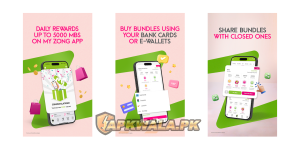
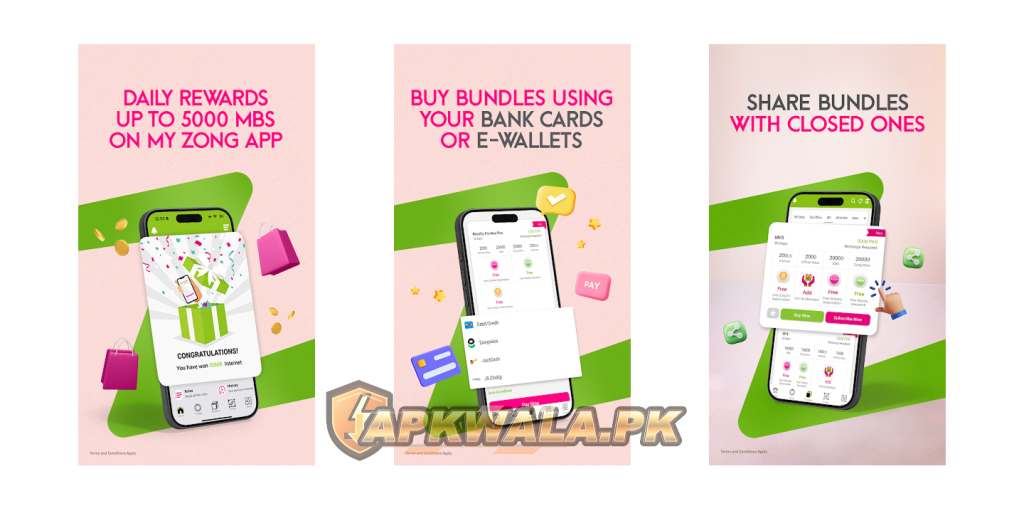
My Zong APK is Zong’s Android self-care app for checking balance and remaining resources, buying packages, viewing recent usage and managing linked Zong numbers. Install it from Google Play or the official Zong page. A telecom account contains usage records and payment details, so a random mirror is a poor place to get the app.
The official Google Play listing is named My Zong, published by CMPak – Zong, with Android package com.zong.customercare. Check all three details before entering your Zong number or SMS PIN.
My Zong APK information
| App detail | Verified information |
|---|---|
| App name | My Zong |
| Category | Communication and telecom self-care |
| Google Play publisher | CMPak – Zong |
| Android package | com.zong.customercare |
| Google Play downloads | 50 million plus |
| Rating at review time | 4.3 |
| Reviews shown | About 1.5 million |
| Last update shown | July 1, 2026 |
| Minimum Android version stated by Zong | Android 5.0 |
| Languages stated by Zong | English, Urdu and Chinese |
| Price | Free; mobile data and subscribed-product charges may apply |
| Official Android sources | Google Play and Zong’s website |
| Modified APK hosted by APKWala | No |
Google Play can serve device-specific builds, so the My Zong APK version shown on your phone is the best reference. The update date, publisher and package name are more reliable identity checks than a filename from an APK site.
Browse APKWala’s Pakistan Android apps section for other official-source download guides.
What we verified
We checked the live Google Play listing, Zong’s official My Zong page and its current support page on August 3, 2026. Google Play showed 50 million plus downloads, a 4.3 rating and a July 1, 2026 update. Zong’s page confirmed Android 5.0 compatibility, available languages and the app’s account, balance, usage and bundle functions.
We did not access a private Zong account, activate a paid package or claim a registration reward. App screens, offers and eligibility can differ by number. The troubleshooting below uses published Zong instructions and clearly identified symptoms without pretending that every error was reproduced on every Android brand.
How to download My Zong APK safely
Google Play is the easiest route because it checks compatibility and handles later updates. Open the link above, then confirm:
- The title says My Zong.
- The publisher says CMPak – Zong.
- The URL contains
com.zong.customercare. - Your phone shows the normal Play Protect installation flow.
- The app opens without asking you to install another update from an advertisement.
Zong’s official My Zong app page also provides installation choices, including an APK route and Huawei AppGallery instructions. If Google Play is unavailable, start from that zong.com.pk page rather than searching for a re-upload.
Do not install files labelled “My Zong Mod APK,” “unlimited balance,” “free MB hack” or “ad-free premium.” Packages and balance exist in Zong’s network records. Altering an Android file cannot create valid credit, and a modified copy may read the SMS used for account registration.
What can you do in the My Zong app?
The current official pages list these main functions:
- Check prepaid balance or postpaid payment information
- View remaining call, SMS and data resources
- Review usage for calls, SMS, internet, bundles and recharges
- Link and manage up to five Zong numbers
- Buy hybrid, data, voice and SMS bundles
- Create eligible custom bundles
- Download a tax certificate for the registered number
- Share prepaid balance through Yaari Load
- Use customer-care FAQs, videos and live chat
- Manage MBB device accounts and selected digital services
Zong says detailed usage history can cover up to the previous seven days and is available to the authorized default user. The app can lag behind very recent usage, so allow time for a refresh before treating the displayed figure as a billing dispute.
For Jazz subscribers, our SIMOSA APK guide covers the equivalent balance, package and login tasks.
How to register and log in to My Zong APK
Zong’s instructions say to enter the mobile number without its starting zero, using a format such as 31XXXXXXXX, then register. The system sends a password or PIN by SMS and completes registration after verification.
Use the Zong SIM and phone number you control:
- Open the official app.
- Enter your Zong number in the format shown on screen.
- Request one registration PIN.
- Keep the registered SIM active in the phone.
- Enter or allow detection of the newest SMS code.
- Finish the account setup and review linked numbers.
Never share the SMS PIN with a caller, shopkeeper or person offering free data. Zong support can investigate an account without asking you to forward a live login code.
My Zong APK login problem
Wrong number formatting is an easy problem to miss. If the screen asks for the number without zero, entering 031... instead of 31... may prevent registration. Read the current prompt rather than copying a format from an old video.
If the number is correct but login still fails:
- Update My Zong through Google Play.
- Put the registered Zong SIM in the phone.
- Set Android date and time to automatic.
- Turn off VPN and app-cloning tools for one test.
- Switch between Zong mobile data and trusted Wi-Fi.
- Clear the app cache, then reopen it.
- Stop repeated PIN attempts and contact Zong if the account locks.
Clearing cache removes temporary files. Clearing app storage signs you out and can remove local settings, so use it only after confirming that you can receive a new registration SMS.
Roman Urdu login help
Agar My Zong app login nahi ho rahi, number ka format check karein. App agar zero ke baghair number maang rahi hai to 31XXXXXXXX likhein, 031XXXXXXXX nahi. Registered Zong SIM phone mein rakhein, date aur time automatic karein aur Play Store se app update karein. PIN bar bar request na karein.
My Zong OTP or PIN not received
Registration SMS can be delayed by weak signal, a full or filtered inbox, dual-SIM routing or repeated requests. Move to a place with a steady Zong signal and request one fresh code. Older codes may expire when a new one is issued.
Check these items:
- The registered Zong SIM can receive normal SMS.
- Zong is selected when Android asks which SIM to use.
- The Messages app has not placed the text in spam or blocked messages.
- My Zong has the SMS permission requested by its official login flow.
- Battery restrictions are not stopping the app during verification.
- Automatic date and time are enabled.
Do not install an SMS-forwarding or accessibility app to capture the code. If the SMS still does not arrive, contact Zong from the registered number.
Roman Urdu OTP help
Agar My Zong PIN ya OTP nahi aa raha, signal check karke sirf aik naya code request karein. Dual-SIM phone mein Zong SIM select karein aur blocked SMS folder dekhein. Purana aur naya code mix na karein. OTP ya registration PIN kisi ko WhatsApp par na bhejein.
My Zong balance not showing or not refreshing
The dashboard may show an old balance when the network request times out or the app keeps stale local data. Pull to refresh if the option appears, then wait a minute before repeating it.
Try this order:
- Confirm normal web pages load on the current connection.
- Switch once between Wi-Fi and Zong mobile data.
- Close and reopen the app.
- Clear only the My Zong cache.
- Update the app and restart the phone.
- Compare the result with another official Zong balance method.
Do not assume that every reduction is an app display error. A bundle renewal, out-of-bundle data session, subscribed service or completed recharge can change the balance. Open the recent usage and subscription sections before filing a complaint.
Zong states that balance and free-resource checks inside the app carry no separate checking charge, although normal internet access and product charges can apply.
Package activated but resources not showing
After buying a package, save the confirmation screen and SMS. The app may need a fresh network response before it displays the allowance.
If the package price was deducted but resources remain missing:
- Do not buy the same bundle again immediately.
- Record the package name, price, time and transaction message.
- Restart the app and refresh the resources section.
- Check whether the offer was for prepaid, postpaid or a specific eligibility group.
- Confirm any night-time, app-only or location condition.
- Contact Zong with the transaction details if the allowance stays absent.
The label “free resources” usually means the remaining minutes, SMS or data already included in an active offer. It does not mean a My Zong APK gives unlimited free usage.
My Zong APK free MB offer explained
Zong’s official page currently advertises 6 GB on first-time app registration, described as 200 MB daily for 30 days. This is an eligibility-based promotion, not a permanent download reward.
Check the offer details shown for your number before relying on it. A user who previously registered, changed phones, reinstalled the app or used another linked number may not qualify. Daily data can also expire instead of rolling into one 6 GB balance.
Avoid videos promising that clearing app data, cloning My Zong or installing an old APK will repeat the registration reward. The network determines eligibility. Reinstallation does not make an old account new.
Roman Urdu free MB help
My Zong ka first-registration offer eligible naye user ke liye hota hai. Official page 6 GB ko 30 din tak rozana 200 MB ke taur par describe karti hai. App uninstall karke dobara install karne se offer lazmi nahi milta. Apne number par jo terms show hon, unhein activation se pehle parhein.
My Zong package purchase failed
A package can fail because the balance is too low, the number is not eligible, the network request timed out or the offer changed. First check whether money was deducted.
If nothing was deducted, refresh the current offer terms and try once on a stable connection. If balance was deducted, do not keep tapping Subscribe. Save the error and confirmation details, then use official support.
For custom bundles, Zong also lists *3031# as an official route for Make Your Own Package. Availability and prices can vary, so read the confirmation before accepting the charge.
My Zong APK not working after an update
An update can leave old cached data that no longer matches the new screens. Start with a normal phone restart and clear the app cache. Check that Android System WebView, Chrome and Google Play services are current if a page inside the app stays blank.
If the July 2026 build repeatedly crashes:
- Free some device storage.
- Remove battery and data restrictions during testing.
- Turn off overlays, app cloning and screen filters.
- Install the official build over an official existing copy.
- Record the phone model, Android version and failing screen.
- Report the details to Zong rather than installing an older mirror.
Recent Google Play reviews mention refresh, package and location-prompt complaints. A review proves that a user saw the symptom; it does not establish one cause for every phone. Zong’s release note says the July update includes bug fixes and performance improvements.
Location permission keeps appearing
Some current Play reviews report repeated requests to enable location. Android may connect location permission with nearby or network features, while the app may also use location for service availability or maps. The exact reason should be explained by the permission screen and Zong’s privacy information.
If you do not want to grant it, choose the least access Android offers and see whether basic balance and package functions still work. Do not download a patched APK to remove the prompt. A modified copy creates a larger privacy risk than a permission you can deny in Android Settings.
Review permissions under Settings > Apps > My Zong > Permissions. Remove access that is not needed, then test the function you use. Some features may stop until access is restored.
My Zong APK update not installing
When Google Play shows an update but cannot install it:
- Check free storage.
- Restart the phone.
- Update Google Play Store and Google Play services.
- Clear the Play Store cache.
- Check parental-control, work-profile and device-policy restrictions.
- Confirm the installed My Zong copy came from an official source.
A package-conflict or signature error often appears when an unofficial copy is already installed. Do not disable Play Protect to overwrite it. Remove the untrusted file and reinstall through Google Play or Zong’s own website.
My Zong for old Android phones
Zong’s official page states Android 5.0 or above. Google Play still decides compatibility for the particular phone and current build. A device running Android 5 may technically meet the stated minimum but struggle with storage, WebView or newer security components.
If Google Play says incompatible, install any official system update, update Play services and check device certification. An old My Zong APK may install but fail at login because the server expects a newer flow.
Use Zong’s official USSD, helpline or web options if the phone cannot run the current app. Account access is more important than preserving an old interface.
Is My Zong APK safe?
The official build is tied to publisher CMPak – Zong and package com.zong.customercare. Google Play currently says the app may share location, personal information and other listed data types, and may collect app activity, performance information and device identifiers. It also says data is encrypted in transit and users can request deletion. These are developer-provided disclosures, not an independent audit.
Use the official app, review permissions and keep Android updated. APKWala does not host a modified or re-signed copy.
Our JazzCash APK guide has further advice about protecting OTPs and account credentials in apps linked to money.
Official My Zong support
Zong lists the following support routes on its official contact page:
- Call 310 from a Zong number, 24 hours a day
- Dial (051) 111-222-111 from another network
- Send
helpby SMS to 310 for product information - Use the complaint registration and digital support links on Zong’s website
- Visit a Zong service centre or franchise for SIM-specific issues
Zong says connecting to a customer-service officer through 310 costs Rs. 2 plus tax, while the help SMS to 310 is free. Charges and routes can change, so confirm them on the support page.
When reporting an app problem, include the number, phone model, Android version, app version, exact message and time. Never include an OTP, registration PIN or full payment-card details in a public review or screenshot.
My Zong APK FAQs
What is the official My Zong package name?
The Android package is com.zong.customercare. The Google Play publisher is CMPak – Zong.
What is the latest My Zong version?
Google Play showed a July 1, 2026 update when checked on August 3, 2026. Its public listing did not provide one universal version number in our checked view. Open Android’s app information or the My Zong settings screen to check the build installed on your phone.
How can I check my Zong balance in the app?
Sign in with the registered Zong number and open the account dashboard. It shows current balance or postpaid dues along with remaining resources. Refresh once if the figure appears old.
Is checking balance in My Zong free?
Zong’s app FAQ says there is no separate charge to check balance or free resources. Internet and package charges can still apply.
How do I get free MB from My Zong?
Zong currently advertises 6 GB for eligible first-time registrations, allocated as 200 MB daily for 30 days. Check the terms shown for your number. Reinstalling does not guarantee another reward.
Why is My Zong not showing my package?
Refresh the app, check recent usage and wait for the activation SMS. If balance was deducted, save the transaction details and contact Zong instead of buying the bundle again.
Can I use My Zong for more than one number?
Zong says the app can link and manage up to five Zong numbers. Only add numbers you own or are authorized to manage.
Is My Zong available in Urdu?
Yes. Zong’s official page lists English, Urdu and Chinese as app languages.
Install from the verified Play listing, check the number format before requesting a PIN, and keep screenshots of any failed paid transaction. If an account-specific problem remains, call 310 from the registered Zong number.