
Jazz World is now SIMOSA, but it is still the official self-care app connected to Jazz services. Jazz announced the new name on May 6, 2024. The Android package stayed com.jazz.jazzworld, which is why Jazz World still appears in the Play Store URL and parts of Android settings.
You do not need a separate old Jazz World app. If you already had the official app, updating it through Google Play should replace the old name and design with SIMOSA. You may need to sign in again, but the rebrand does not create a second Jazz mobile account.
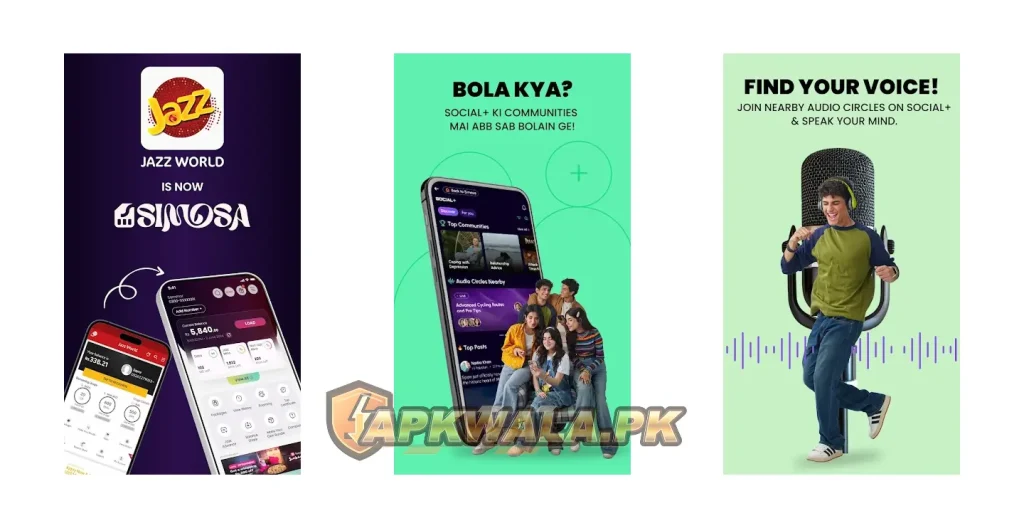
Short answer: update the existing app from the official SIMOSA Google Play listing. Check that the developer is Jazz Digital Pakistan and the package is
com.jazz.jazzworld.
Jazz World is now SIMOSA: what was officially announced?
Jazz announced the change in Islamabad on May 6, 2024. Its statement described SIMOSA as a redesigned version of Jazz World with broader self-care and lifestyle features. It also expanded parts of the app beyond Jazz customers by adding support for services across multiple mobile networks.
The name changed, the interface changed and the feature range grew. The official Android identity did not change. Google Play still uses the same package that Jazz World used: com.jazz.jazzworld
That package continuity is the clearest technical evidence that SIMOSA is the successor to Jazz World rather than an unrelated app. Jazz’s own rebrand announcement calls it a transformation of Jazz World.
| Before | Now |
|---|---|
| Jazz World | SIMOSA – Jazz World |
| Jazz-focused self-care app | SIM care plus lifestyle and community features |
| Old Jazz World branding | SIMOSA branding and redesigned screens |
Package com.jazz.jazzworld | Same package com.jazz.jazzworld |
| Balance and bundle tools | Balance, bundles, complaints, rewards and more |
We checked Jazz’s announcement and the live Google Play listing on August 8, 2026. Google Play showed an update date of July 30, 2026, more than 50 million downloads and Jazz Digital Pakistan as the developer. The listing itself states that Jazz World is now SIMOSA. Store details can change after publication.
Browse our Pakistan telecom app guides for other official account-app instructions.
Why did Jazz World change to SIMOSA?
Jazz wanted the app to cover more than basic telecom account management. The original announcement described SIMOSA as a multi-network app with expanded account support, recharge, subscriptions and lifestyle tools.
The current Play listing groups its features into SIMCare, Lifestyle and Social+. SIMCare contains familiar telecom functions such as balance checks, usage details, top-ups, bill payments, bundles, complaints and tax certificates. The other areas add content, discounts, learning, entertainment and community features.
SIMOSA also includes SIA, an assistant that accepts English, Urdu and Roman Urdu. The listing says it can help activate bundles, suggest packages and submit or track complaints.
The broader menu is also why the app may feel less direct than the old Jazz World screen. If you only want to check balance or data, open SIMCare and select the correct number rather than searching through Lifestyle or Social+.
Jazz World is now SIMOSA: do existing accounts still work?
Jazz World is now SIMOSA under the same Android package, so users do not register a second Jazz telecom account merely because the app name changed. Your Jazz number, prepaid or postpaid status, balance and active packages are held by Jazz’s account systems, not created by the app icon on your home screen.
You may still be asked for an OTP after an update, reinstall or device change. That is a login check. It does not mean your account was erased during the rebrand.
Use the same mobile number you previously used with Jazz World. After signing in, check that SIMOSA has selected the correct number, especially if you manage several numbers in one profile.
If the app shows no balance or packages, do not buy the same bundle again immediately. Refresh the account screen, confirm the selected number and check the Jazz confirmation SMS first.
For the download page, version checks and detailed package troubleshooting, use our official SIMOSA APK guide. This article stays focused on the rename, update and account transition.
Jazz World is now SIMOSA: how to update safely
If the old Jazz World app is still installed:
- Open Google Play on the same Android phone.
- Search for SIMOSA – Jazz World.
- Confirm the developer is Jazz Digital Pakistan.
- Check that the listing URL contains
com.jazz.jazzworld. - Tap Update.
- Open the updated app and complete OTP verification if requested.
- Check your number, balance and active packages before making a purchase.
Do not uninstall first unless Google Play cannot update the verified app. A normal update keeps the package and its stored app data in place. Android may still clear a session or SIMOSA may request fresh verification for security reasons.
If Play shows Open rather than Update, your phone may already have the current build offered to that device. Open it and check whether the name and icon have changed. Google Play rollouts can reach devices at different times.
Roman Urdu: Jazz World ko SIMOSA mein update kaise karein
Play Store khol kar SIMOSA – Jazz World search karein. Developer Jazz Digital Pakistan aur package com.jazz.jazzworld check karein, phir Update dabayein. Purani app ko pehle uninstall karna zaroori nahi. Update ke baad OTP aaye to apna registered Jazz number use karein.
Jazz World is now SIMOSA but the old name still appears
Seeing the old name in the package, Play URL or an Android backup is normal. Developers often keep an established package name after a public rebrand because changing it would turn the update into a separate application.
Try these steps if the home-screen label still says Jazz World:
- restart the phone after updating;
- open the app once from its Google Play page;
- clear the launcher cache only if other app names or icons are also stale;
- remove an old home-screen shortcut and add the current app icon again;
- check whether a work profile or cloned copy still contains the older build.
Do not install another file merely to change the icon. The package, developer and Play listing matter more than a cached launcher label.
Jazz World is now SIMOSA: login and OTP fixes
An OTP failure is usually a number, SIM, signal or messaging problem rather than a lost Jazz World account.
- Enter the same Jazz number used with the old app.
- Keep that SIM active in a dual-SIM phone.
- Confirm the SIM can receive normal SMS messages.
- Turn Airplane mode on and off, then wait for the network to reconnect.
- Set Android date and time to automatic.
- Check blocked or spam SMS folders.
- Request one new OTP and use the newest code.
- Turn off a VPN or Private DNS for one test.
Never share an OTP with someone offering an old version, free MBs or account recovery. APKWala and Jazz support do not need your one-time code in a public comment.
Roman Urdu: update ke baad login nahi ho raha
Agar update ke baad SIMOSA login nahi ho raha, wohi number enter karein jo Jazz World mein use hota tha. Dual-SIM phone mein Jazz SIM active rakhein aur signal check karein. Phone ka time automatic karein. Naya OTP sirf aik dafa request karein aur kisi ko forward na karein.
Balance, package or rewards missing after migration
Jazz World is now SIMOSA, but the redesigned home screen can place familiar options in different sections. Open SIMCare first and confirm that the correct Jazz number is selected.
Then check in this order:
- Refresh the balance and usage screen.
- Compare the app with the latest balance or bundle confirmation SMS.
- Close and reopen SIMOSA.
- Switch once between Jazz mobile data and Wi-Fi.
- Clear the app cache without clearing storage.
- Wait before repeating a paid subscription.
- Save transaction references if money was deducted.
Promotional rewards can change by number, eligibility and date. An offer that appeared in Jazz World may have ended or moved to another section. Do not assume the rename removed paid balance, and do not treat a temporary reward as account money.
Jazz’s official self-service information lists balance, usage, bundle management, bill payment, complaints and tax certificates among the app’s account tools.
Roman Urdu: balance ya package show nahi ho raha
SIMCare open karke sahi Jazz number select karein. Screen refresh karein aur confirmation SMS check karein. Agar paisay deduct hue hain to package dobara activate na karein. Transaction reference save karke official complaint submit karein.
SIMOSA update not installing over Jazz World
Google Play may fail to update when storage is low, another download is pending or the installed app came from an unofficial source.
Start with these fixes:
- free enough storage for the download and installation process;
- restart Android;
- clear the Google Play Store cache;
- install pending Android and Play system updates;
- remove a work-profile restriction if the phone belongs to you;
- check whether Play Protect has flagged the installed copy.
A signature conflict is more serious. Android will not let the official Play build replace a copy signed by someone else, even when both use com.jazz.jazzworld. If you previously installed a mirror APK, make sure you can receive the login OTP, remove the unverified copy and install SIMOSA from Google Play.
Do not use a patched installer or signature-bypass tool. The Android check is protecting an app connected to your mobile account and payments.
Should you install a Jazz World old version?
An old Jazz World APK may restore the former icon or layout, but it cannot turn Jazz’s current systems back to 2023. Old builds may fail at login, packages, complaint tracking or server communication. They also miss later security and stability fixes.
There is another practical problem: third-party archives can label an unrelated or modified file as Jazz World old version. The familiar name does not prove that Jazz signed it.
Use the current official SIMOSA build unless Jazz support gives a specific alternative. If a redesigned screen is confusing, the safer answer is a current walkthrough, not an outdated telecom app.
Roman Urdu: purana Jazz World install karna chahiye?
Nahi. Sirf purana naam ya design wapas lane ke liye old APK install na karein. Purani app login aur packages ke current system ke saath kaam na bhi kare. Official SIMOSA update use karein aur SIMCare mein apna number check karein.
What stayed the same after the rename?
The Android package stayed com.jazz.jazzworld, and the app still provides core Jazz self-care tools. Jazz prepaid and postpaid users can check usage, manage eligible bundles, recharge, pay bills, download tax certificates and submit complaints.
The Play listing also says users can manage up to five numbers from one account. Availability can depend on account type and the version served to your device.
The support history also carries traces of the old brand. Google Play still lists jazzworld@jazz.com.pk as a support email while app responses may direct users to hello@simosa.com.pk. That overlap is consistent with a rebrand, but contact details should always be checked on the live official listing before sending account information.
What changed in SIMOSA?
The most visible change is the wider feature set. Current SIMOSA material describes:
- SIMCare for number, usage, balance, bundles and complaints;
- Lifestyle features such as content, learning, discounts and daily tools;
- Social+ profiles, posts, groups and community activity;
- SIA assistance in English, Urdu and Roman Urdu;
- support for some users and services outside the Jazz network.
Not every feature applies to every number. A non-Jazz user will not receive the same telecom controls as an eligible Jazz prepaid or postpaid account.
Jazz World is now SIMOSA: common questions
Is SIMOSA the official replacement for Jazz World?
Yes. Jazz announced the rebrand on May 6, 2024, and the Google Play listing uses the same com.jazz.jazzworld package.
Do I need to create a new Jazz account?
No new telecom account is required solely because of the rename. Sign in with the number previously used in Jazz World and complete OTP verification if requested.
Will updating remove my balance or active package?
Your mobile balance and package status belong to the Jazz account, not the app icon. After updating, select the correct number and compare the app with confirmation SMS records. Report a genuine mismatch to Jazz.
Why does the Play Store URL still say Jazz World?
The official package remains com.jazz.jazzworld. Keeping the package lets Google Play treat SIMOSA as an update to the existing app.
Can non-Jazz users install SIMOSA?
The current Play listing says non-Jazz SIM users and Pakistanis abroad can use parts of SIMOSA. Jazz-only account controls still require an eligible Jazz number.
Where are balance and packages in SIMOSA?
Open SIMCare, choose the correct number and look for balance, usage and bundle controls. Their exact position may change between app updates.
Is the old Jazz World APK safe?
An old file is unnecessary for the rename and may no longer work with current services. A file from a mirror may also have an unknown signature.
Who can fix a Jazz account or payment problem?
Use SIMOSA’s complaint tool or Jazz’s official support channels. This independent article cannot access an account or reverse a transaction.
Use SIMOSA without creating a second competing download page
Jazz World is now SIMOSA, and the official app remains attached to com.jazz.jazzworld. Update through Google Play, use the same registered number and check SIMCare after signing in. If the issue is specifically about downloading, installing or checking the latest build, use the SIMOSA download page linked earlier in this guide.
For comparison with another Pakistani telecom self-care app, see our My Zong login and update guide.