
Tapmad APK is the official Android app for watching licensed live sports and other Tapmad content in Pakistan. The current Google Play listing focuses on cricket, football, tennis, UFC, match alerts, scores, highlights, casting and split-screen viewing. Some streams are free, while premium events require an active subscription.
The official listing is named tapmad: Live Sports, published by tapmad, with Android package com.tapmad.tapmadtv. Confirm those details before entering a mobile number or payment information.
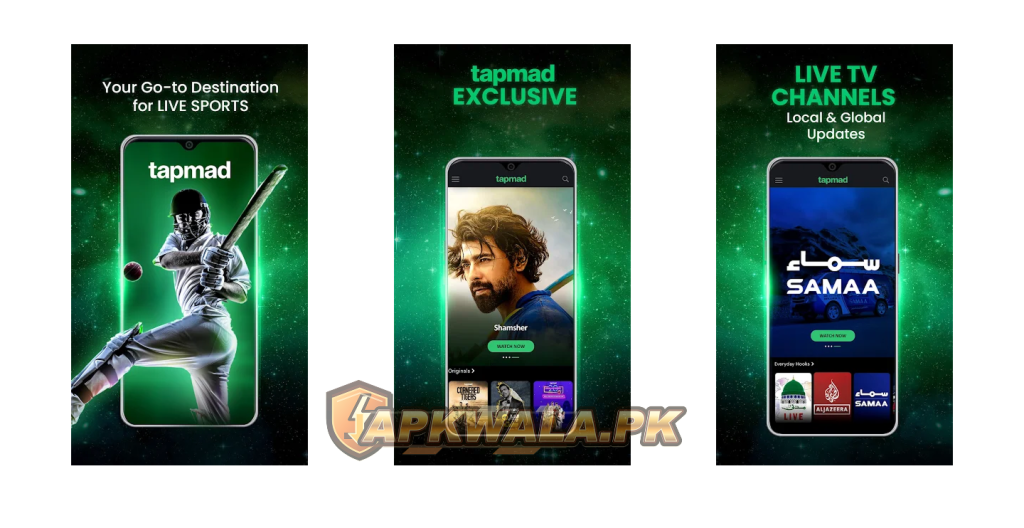
Tapmad APK information
| App detail | Verified information |
|---|---|
| App name | tapmad: Live Sports |
| Category | Live sports and streaming |
| Google Play publisher | tapmad |
| Android package | com.tapmad.tapmadtv |
| Operator in Pakistan | Pi Pakistan Pvt. Ltd. |
| Google Play downloads | 10 million plus |
| Rating at review time | 2.6 |
| Reviews shown | About 32,000 |
| Last update shown | June 22, 2026 |
| Content rating | Teen |
| Supported listing devices | Android phone, tablet and Chromebook |
| TV options advertised | TV viewing and casting |
| Price | Free installation; ads and paid subscriptions apply |
| Modified APK hosted by APKWala | No |
Google Play did not expose one universal Tapmad APK version number in our checked public view. Tapmad may distribute different builds by device. Check the installed version under Android’s app information rather than trusting a filename copied from an APK mirror.
Browse APKWala’s Pakistan Android apps section for other official-source guides.
What we verified
We checked the Google Play listing, Tapmad FAQs, Terms of Use and refund policy on August 3, 2026. Google Play showed 10 million plus downloads, a 2.6 rating and a June 22, 2026 update. Tapmad’s legal pages confirmed recurring billing, cancellation rules and the packages displayed when we reviewed them.
We did not buy a subscription, open a private account or test a live match. Sports rights, prices, devices and picture quality can change by event and location. This guide does not claim that Tapmad carries every cricket series or every PSL season.
How to download Tapmad APK safely
Use Google Play on a certified Android phone whenever possible:
- Open the official listing above.
- Check that the app says tapmad: Live Sports.
- Confirm the publisher is tapmad.
- Verify that the URL contains
com.tapmad.tapmadtv. - Tap Install or Update.
- Open the app from Android, not from an advertisement or message link.
Avoid files labelled “Tapmad Premium APK,” “free subscription mod,” “all matches unlocked” or “ad-free patched.” A modified app cannot give legitimate access to licensed premium streams. It may steal account credentials or payment information, and it can stop working as soon as Tapmad changes its server checks.
APKWala does not mirror a modified Tapmad file. The download button should lead to Google Play.
Can you watch live cricket and PSL on Tapmad?
The current Tapmad APK description promises live cricket coverage across international matches, domestic matches, leagues and tournaments. That wording does not guarantee one particular fixture.
Broadcast rights change by season, country and competition. Before paying:
- Search for the exact match or tournament inside Tapmad.
- Open its event page and check the start time.
- Confirm that the stream is available in Pakistan.
- Check whether it is free, ad-supported or premium.
- Read the package duration and renewal terms.
- Look for an official Tapmad announcement for the event.
The same applies to the Pakistan Super League. An old page, app-store title or search result mentioning HBL PSL may refer to a previous season. Do not subscribe solely because an APK website says “PSL live.” Confirm the current season inside Tapmad immediately before purchase.
For another Pakistan streaming option, compare our Tamasha APK live cricket and TV guide.
Tapmad subscription prices and recurring billing
Tapmad’s Terms of Use displayed these plans when checked:
| Plan | Price shown by Tapmad |
|---|---|
| Weekly | Rs. 249 |
| Monthly | Rs. 499 |
| Annual | Rs. 4,500 |
| Premium promotional pack | Rs. 1 for the first day |
These prices can change. The checkout screen for your account is the final price to review before paying.
The important detail is renewal. Tapmad says subscriptions are billed in advance on a recurring basis. Its terms also describe step-down charges when the linked payment account lacks enough balance for the full renewal. A lower amount may be charged for a shorter extension unless the subscription is cancelled.
Read the amount, billing period and auto-renewal box before confirming JazzCash, Easypaisa, card or another payment method. A cheap first day is not the price of the next billing cycle.
How to cancel a Tapmad subscription
Tapmad’s refund policy says to sign in, open the User Profile and select Unsubscribe under Current Status. Confirm the prompt. A Tapmad APK subscription is tied to the account and payment method, not to whether the app remains installed. The Terms of Use also describe cancellation on the website under Account, Billing Information and the subscription edit option.
Cancel before the next renewal date:
- Sign in to the same account used for payment.
- Open Profile or Account.
- Find Current Status or Billing Information.
- Choose Unsubscribe or Cancel.
- Confirm the cancellation.
- Save a screenshot of the confirmation and renewal date.
- Check the linked payment account after the expected billing date.
Tapmad’s policy says cancellation prevents the next billing and does not produce a refund for the unused remainder of the current paid period. If the subscription was purchased through Google Play, also inspect Play Store > Payments and subscriptions > Subscriptions because store-managed billing may need cancellation there.
Read the official Tapmad subscription terms before paying, especially the recurring and step-down charge sections.
Roman Urdu cancellation help
Agar Tapmad subscription band karni hai to renewal date se pehle same account mein login karein. Profile ya Account khol kar Current Status ya Billing Information mein Unsubscribe select karein. Confirmation ka screenshot save karein. Sirf app uninstall karne se subscription cancel nahi hoti.
Tapmad payment deducted twice
Do not make another payment while the first transaction is unclear. Save both payment messages, transaction IDs, amounts, dates and the Tapmad account number or email.
Then:
- Open the subscription status and check its expiry date.
- Check whether one charge was a renewal or step-down charge.
- Compare the receipts with the linked wallet or card history.
- Take screenshots that hide most card or wallet details.
- Email Tapmad support with both references.
Developer replies on Google Play have asked users reporting duplicate payments to send payment screenshots and registered details to customerservice@tapmad.com. Never send an OTP, wallet PIN or complete card number.
For wallet safety basics, see our JazzCash APK login and transaction guide.
Tapmad APK login problem
Login can fail because the number format is wrong, an OTP is delayed, the app is outdated or the account was created through another method.
Try these checks:
- Update Tapmad through Google Play.
- Confirm the mobile number or email matches the subscription account.
- Put the registered SIM in the phone when requesting an OTP.
- Set Android date and time to automatic.
- Turn off VPN and app cloning for one test.
- Switch between mobile data and trusted Wi-Fi.
- Clear the Tapmad cache and reopen the app.
Do not create multiple accounts to find a paid subscription. If payment belongs to another login, contact support with the transaction reference and registered details.
Roman Urdu login help
Agar Tapmad login nahi ho raha, wohi number ya email use karein jis par subscription li thi. Registered SIM phone mein rakhein, date aur time automatic karein aur Play Store se app update karein. VPN temporary band karke aik dafa dobara try karein.
Tapmad OTP not received
Weak signal, a filtered inbox, dual-SIM routing or repeated requests can delay the code. Request one fresh OTP and use the newest message only.
Check that:
- The registered SIM receives normal SMS.
- Android selected the correct SIM.
- The message is not in spam or blocked SMS.
- Tapmad has the permission requested by its official login flow.
- Battery restrictions are not suspending the app.
- The phone uses automatic time.
Never forward the OTP to anyone claiming to activate free premium access. Tapmad support does not need a live OTP to read a payment reference.
Tapmad APK not working or keeps crashing
The June 2026 Play release note says “Bug fixes,” but current reviews still include individual reports of crashes and interrupted streams. A review confirms a symptom for that user; it does not prove one cause for every phone.
Start with the lowest-risk fixes:
- Force close Tapmad and reopen it.
- Restart the phone.
- Free storage space.
- Update Tapmad, Android System WebView and Google Play services.
- Clear the app cache.
- Turn off screen overlays and app cloning.
- Reinstall from Google Play if the official package is damaged.
Clearing app storage signs you out. Confirm that you know the login and can receive a new OTP before doing it.
Tapmad live stream buffering in Pakistan
Tapmad APK buffering can happen even when a speed test looks fast. Live video needs a stable connection because packet loss, Wi-Fi interference and network congestion during a major match can interrupt playback.
Test this order:
- Lower the stream quality from Auto or HD.
- Pause other downloads and cloud backups.
- Move closer to the Wi-Fi router.
- Switch between 2.4 GHz and 5 GHz Wi-Fi if both exist.
- Test once on mobile data to separate app and broadband problems.
- Turn off VPN, private DNS filtering and ad blockers for one test.
- Restart the router if every device is slow.
Do not clear app data in the middle of a paid match unless basic network tests fail. It can create another login problem without repairing congestion at the streaming server.
Roman Urdu buffering help
Agar Tapmad match buffer kar raha hai to video quality Auto se 720p ya is se kam par set karein. Background downloads band karein aur router ke qareeb aa kar test karein. Aik dafa mobile data par stream khol kar dekhein. Agar har network par same masla ho to exact match aur time support ko bhejein.
Audio works but video is black
A black screen with sound can involve video decoding, casting, WebView, DRM checks or an unsupported display connection.
Try:
- Stop casting and play on the phone screen.
- Close screen recording, overlays and picture-in-picture apps.
- Update Android and Tapmad.
- Restart the device.
- Change stream quality.
- Test another free video in Tapmad.
Do not use screen-capture bypass modules or patched players. Licensed streams may deliberately block recording or unsupported display paths.
How to watch Tapmad on Android TV
Tapmad advertises TV viewing and casting, and its FAQs include Smart TV access. A Tapmad APK for Android TV may not be the same build used on a phone. Availability can differ between Android TV, Google TV and manufacturer-specific stores.
On Android TV or Google TV:
- Open the TV’s Google Play Store.
- Search for tapmad.
- Install the listing published by tapmad if it appears as compatible.
- Sign in with the subscribed account.
- Open a free item before testing premium content.
If the TV store says the app is unavailable, do not install a phone APK blindly. Phone builds may require touch controls, use the wrong screen layout or fail DRM checks on television hardware.
Tapmad casting not finding the TV
The phone and TV must usually share the same Wi-Fi network. Open Tapmad and the TV before tapping Cast.
If the TV does not appear:
- Confirm both devices use the same Wi-Fi name.
- Avoid guest Wi-Fi, which can isolate devices.
- Turn off VPN on the phone and TV.
- Restart the Tapmad app and casting receiver.
- Update Google Play services and Chromecast components.
- Reboot the router if other casting apps also fail.
If other apps can cast but one Tapmad stream cannot, the event or device may have a content-protection limitation. Report the exact event, phone and TV model to Tapmad.
Roman Urdu Android TV help
Agar Tapmad TV par show nahi ho raha, Android TV ke Play Store mein official tapmad search karein. Phone APK USB se sideload na karein jab tak Tapmad us model ko support na kare. Casting ke liye phone aur TV aik hi Wi-Fi par hon aur guest network use na ho.
Tapmad stream quality looks poor on a large TV
A stream that looks acceptable on a six-inch phone can expose compression on a 50-inch screen. Check whether the event and package actually offer the quality shown in marketing. Then set quality manually, use 5 GHz Wi-Fi near the router and stop other household downloads.
Casting the phone and using a native TV app can produce different results because they may request different stream profiles. Test both official methods if available. APKWala cannot promise 1080p, 4K or a particular frame rate for every event because Tapmad controls the stream and rights.
Subscription active but premium match remains locked
First confirm that the active package includes that exact event. A general subscription does not always mean every licensed competition is included on every device or in every territory.
Then:
- Sign out and sign back into the paid account.
- Check the subscription expiry date.
- Restore the purchase if the app provides that option.
- Open the same event on Tapmad’s website.
- Save the lock message and payment reference.
- Contact support without buying the plan twice.
Region-restricted premium content may be unavailable outside Pakistan. Tapmad’s Terms prohibit bypassing territorial restrictions, so a VPN is not a safe fix.
Tapmad APK update not installing
If Google Play cannot update Tapmad:
- Check free storage.
- Restart the phone.
- Clear the Play Store cache.
- Update Play Store and Google Play services.
- Check work-profile, parental-control and device-policy restrictions.
- Confirm the installed package came from an official source.
A signature conflict often means a differently signed copy is installed. Do not disable Play Protect to overwrite it. Remove the untrusted copy and reinstall the official package, after confirming your login details.
Is Tapmad APK safe?
The official Google Play build is tied to package com.tapmad.tapmadtv and publisher tapmad. Google Play currently says the app may share device or other identifiers with third parties, does not declare collected data in the shown summary, encrypts data in transit and allows deletion requests. These disclosures come from the developer and can change.
Subscription accounts deserve extra care. Use a unique password, protect OTPs, inspect recurring billing and remove unneeded permissions. Do not use a modified build to unlock premium content.
Official Tapmad support
The current sources list several support contacts:
- Customer-service email in Tapmad terms:
customerservice@tapmad.com - Google Play support email:
support@pitelevision.com - Google Play support phone:
+92 21 35302095 - Refund-policy office numbers:
021-36102121and021-36102122
Tapmad’s official FAQs cover subscription, devices, Smart TV, buffering and login. When reporting a problem, include the registered account, package, payment reference, device model, app version, event and time. Hide OTPs, wallet PINs and full card numbers.
Tapmad APK FAQs
What is the official Tapmad package name?
The Android package is com.tapmad.tapmadtv. The official Play title is tapmad: Live Sports.
What is the latest Tapmad version?
Google Play showed an update dated June 22, 2026 when checked on August 3, 2026. Its public page did not show one universal build number. Check the installed version on your device.
Is Tapmad free?
The app is free to install and some services may be free or ad-supported. Premium events require a subscription. Check the event and checkout screen before paying.
Can I watch PSL live on Tapmad?
Possibly, depending on the current season’s digital rights and your region. Confirm the exact PSL season and match inside the official app. An old search result is not proof of current coverage.
Does Tapmad work on Android TV?
Tapmad advertises TV viewing, but compatibility varies. Search the TV’s own Play Store for the official app. Casting from a supported phone is another official option.
How do I stop Tapmad recurring charges?
Sign in before renewal, open Profile or Account, find Current Status or Billing Information and confirm Unsubscribe. Also check Google Play subscriptions if Google processed the purchase.
Will uninstalling Tapmad cancel my subscription?
No. Removing the app does not cancel recurring billing. Use the account’s unsubscribe control and save the confirmation.
Why is Tapmad buffering during a live match?
Lower the quality, pause other downloads, test another network and disable VPN for one test. If every network fails on the same event, send the match and time to Tapmad support.
Check the exact fixture before subscribing, cancel through the account rather than uninstalling, and use customerservice@tapmad.com for unresolved billing issues.