
Tamasha APK is a Pakistani streaming app for live TV, sports content, shows, podcasts and short videos. Beyond Digital publishes separate official apps for Android phones and Android TV, so choosing the correct Google Play listing matters. The phone app and TV app do not use the same package name.
Cricket availability changes with broadcasting rights. A match or tournament that appeared on Tamasha last month may not be available today, and some streams require a paid subscription. Check the live schedule inside Tamasha before buying a package for one event.
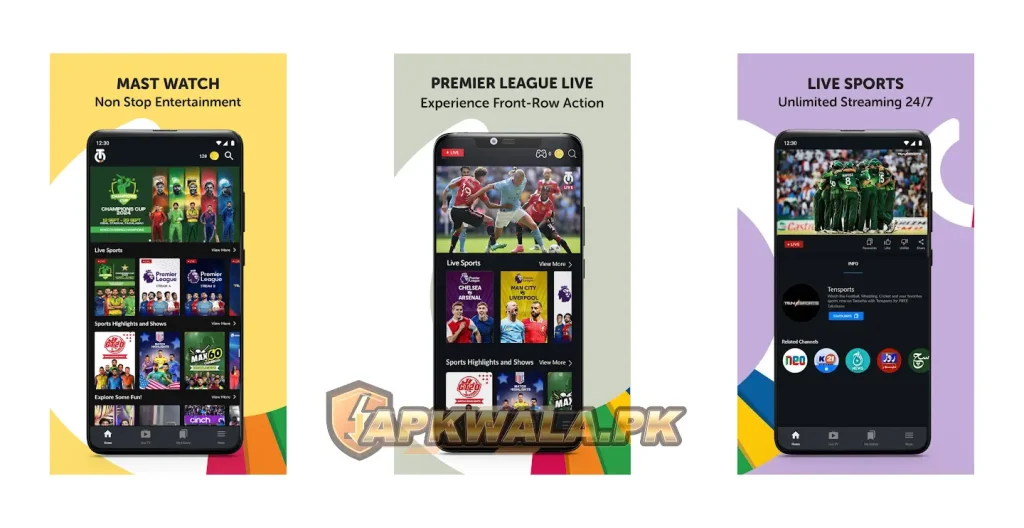
APKWala does not host a modified Tamasha file. Streaming accounts can contain your mobile number and payment details, and unofficial builds may fail DRM or account checks anyway.
Tamasha APK information
| App detail | Phone and tablet app | Android TV app |
|---|---|---|
| Official listing name | Tamasha: Live TV, Movies | Tamasha: Live Cricket, Movies |
| Publisher | Beyond-Digital | Beyond-Digital |
| Package name | com.spbtv.mobilinktv | com.bd.tamashatv |
| Google Play downloads | 50 million plus | 1 million plus |
| Devices | Android phone, tablet and Chromebook | Android TV and Google TV |
| Price | Free installation with ads and in-app purchases | Free installation; some content needs a subscription |
| Phone app update checked | July 22, 2026 | May 23, 2026 |
| Official source | Google Play | Google Play |
| Modified APK hosted by APKWala | No | No |
The ratings, update dates and catalogue can change. Google Play also rolls out builds by device and account, so a third-party page’s version number may not match the build offered to your phone.
Browse APKWala’s Pakistan Android apps section for more official-source download and troubleshooting guides.
What we verified
We checked both Google Play listings, Tamasha’s website, terms and privacy notice on August 1, 2026. The mobile listing showed Beyond-Digital, package com.spbtv.mobilinktv, more than 50 million downloads and a July 22, 2026 update date. The separate TV listing used com.bd.tamashatv and showed more than 1 million downloads.
We did not sign in to a private account, start a paid subscription or test a live match. Tamasha changes sports rights, free content, premium access and prices. This guide explains the current official setup without promising that a future fixture will be available.
How to download Tamasha APK safely
For a phone or tablet:
- Open the phone-app Google Play link above.
- Confirm the publisher is Beyond-Digital.
- Check that the URL contains
com.spbtv.mobilinktv. - Tap Install or Update.
- Open Tamasha and sign in if the content asks for an account.
For a television, use the Play Store on your Android TV or Google TV device and install the listing made for TV. You can also open the official Tamasha Android TV listing from a browser signed in to the same Google account.
Do not install files advertised as “Tamasha Pro Mod APK,” “free premium unlocked” or “no ads forever.” A changed client cannot grant legal streaming rights. It may instead collect login codes, inject advertising or stop working when the service verifies the app.
Which Tamasha APK should you install?
Install com.spbtv.mobilinktv on an Android phone or tablet. Install com.bd.tamashatv on Android TV or Google TV. The TV package has a remote-friendly interface and a login flow built for a large screen.
Do not sideload the phone APK onto a television unless Tamasha support specifically tells you to. Phone interfaces often respond poorly to a TV remote, and playback or orientation may break. The reverse is also true: the TV package is not the normal choice for a phone.
If a Play Store search shows both apps, check the device label and package before installing. The matching Tamasha name and logo are not enough to tell them apart.
Can you watch live cricket with Tamasha APK?
Tamasha carries live sports and has streamed major cricket events, but access is event-specific. Its website still has live pages for past tournaments, while the current English phone listing focuses more heavily on live TV and sports highlights. That difference is exactly why an evergreen page should not claim that every Pakistan match is live.
Before match time:
- Open the Sports area in the official app or website.
- Look for the exact teams, tournament and date.
- Check whether the stream is free, ad-supported or marked Pro.
- Read any location or device restriction.
- Test account access before the toss rather than at the last minute.
Tamasha’s terms say content may vary by location, time, device and subscription. They also prohibit hiding your real location through a VPN. If the fixture is absent, changing regions is not a reliable or permitted fix.
For current availability, use the official Tamasha website instead of an old search result or an expired tournament page.
Is Tamasha APK free for Jazz users?
Tamasha has free, ad-supported and paid content. Being a Jazz customer does not automatically make every stream free, and a Tamasha subscription does not automatically include mobile data.
The current terms state that standard data charges from the relevant mobile operator can apply in addition to the subscription fee. A temporary Jazz bundle or campaign may include different benefits, but check its expiry date and exact allowance before streaming.
This matters during cricket. A long HD stream can use a substantial amount of data. If you are relying on Jazz mobile data, open the Jazz or SIMOSA account screen and check the active bundle first. APKWala’s SIMOSA APK guide for Jazz users explains how to review account resources and package status.
How to install Tamasha APK on Android TV
- Connect the TV to the internet.
- Open Google Play Store on Android TV or Google TV.
- Search for Tamasha: Live Cricket, Movies.
- Confirm the publisher is Beyond-Digital.
- Install the TV package
com.bd.tamashatv. - Open the app and follow the displayed login method.
The current TV listing says users can sign in through a Tamasha web account, with OTP login available as another option. Follow the code, QR or phone-number instructions displayed on your own TV. Do not send the code to anyone claiming they can activate premium access.
Tamasha not showing in the TV Play Store
First confirm that the television runs Android TV or Google TV. Samsung Tizen, LG webOS and basic smart TVs use different app stores and cannot install an Android TV APK through Google Play.
If the device is compatible but the listing is missing:
- Update the TV’s system software and Play Store.
- Confirm the Google account region is Pakistan.
- Restart the TV and router.
- Search for the publisher name as well as the app name.
- Check whether the device is Play Protect certified.
A cheap Android box may report an unsupported or uncertified device. Sideloading does not guarantee that protected video will play on it.
Tamasha APK live cricket not working
Start by checking whether the match is listed. A blank sports section and a buffering stream are different problems.
If the fixture is listed but video will not play:
- Close other downloads and streams on the same connection.
- Change the video quality from Auto or HD to a lower setting.
- Switch between Wi-Fi and mobile data to isolate the network problem.
- Turn off a VPN, proxy or private DNS that may affect location or playback.
- Set Android date and time to automatic.
- Update Tamasha from Google Play.
- Force stop the app, then reopen it.
- Clear cache only. Clearing app storage signs you out and removes local settings.
If one channel fails while other videos work, the issue may be limited to that feed. If nothing plays, test another app or website on the same network before changing Tamasha settings.
Roman Urdu cricket help
Agar Tamasha par live match nahi chal raha, pehle check karein ke woh match app ke Sports section mein listed hai. Video buffer ho rahi ho to quality HD se kam karein, background downloads band karein aur Wi-Fi ya mobile data change karke dekhein. VPN off rakhein. Match listed hi nahi hai to purani Google link dekh kar yeh assume na karein ke stream ab bhi available hogi.
Tamasha APK buffering or video loading problem
Buffering often gets worse during a popular match because both the home connection and streaming service are under heavier load. You can fix local causes, but you cannot repair a server-side outage from the phone.
Try this order:
- Pause the stream for a few seconds and resume it.
- Lower video quality.
- Move closer to the Wi-Fi router or use 5 GHz Wi-Fi nearby.
- Disconnect unused devices from the connection.
- Restart the router if other services are also slow.
- Disable battery saver and data saver for Tamasha while testing.
- Clear the Tamasha cache.
- Update the app and restart Android.
Avoid repeatedly uninstalling the app during a live event. That adds login and download work without fixing congestion. If the problem continues on two separate networks, record the channel name, time, device model and app version for support.
Tamasha APK login or OTP problem
Use a phone number you can access. If the OTP does not arrive:
- Check the number and country format.
- Make sure the SIM can receive normal SMS messages.
- Turn airplane mode on and off.
- Request one new code and wait.
- Use the newest OTP if several arrive.
- Set the phone’s date and time automatically.
- Try the official website login if the app remains stuck.
Several rapid requests can invalidate older codes. Never share a Tamasha OTP over WhatsApp, in a public comment or with someone offering a discounted subscription.
Agar Tamasha OTP nahi aa raha to number dobara check karein aur aik hi naya code request karein. Multiple OTP aayein to latest code use karein. Registered SIM band ya signal se bahar ho to code receive nahi hoga.
Tamasha subscription activated but Pro is locked
Do not purchase the same plan again straight away. Check the account and payment history first.
- Confirm that Tamasha shows the same registered number used for payment.
- Open Subscription & Payments or the equivalent account section.
- Check whether the transaction is successful, pending or reversed.
- Save the receipt, payment reference and subscription screen.
- Sign out and back in only after confirming the account details.
- Contact official support if payment succeeded but access remains locked.
Tamasha’s terms say a payment can take time to appear in the Subscription & Payments section. They also warn that users may be double billed if they subscribe to more than one plan at the same time.
How to cancel a Tamasha subscription
The official terms say you can cancel through the Subscription & Payments section:
- Sign in to the account that owns the subscription.
- Open the profile or account area.
- Select Subscription & Payments.
- Choose the active plan.
- Select Cancel and finish the on-screen prompts.
- Save the cancellation confirmation.
Cancellation normally stops a future renewal. The current paid period remains non-refundable under the published terms, and access can continue until that period expires. Payment method and campaign rules may differ, so read the plan shown on your screen before confirming.
Tamasha APK not installing or updating
If Google Play refuses the installation:
- Free some storage space.
- Restart Android.
- Update Google Play Store and Google Play services.
- Remove a stuck partial download.
- Check parental controls, work-profile rules or device restrictions.
- Confirm that you selected the phone or TV package for the correct device.
A package-conflict or signature error often means a differently signed APK is already installed. Do not turn off Play Protect to force an unknown file over the official app. Remove the untrusted copy after saving anything you need, then install Tamasha from Google Play.
Should you download Tamasha old version APK?
An old version may look appealing if a recent interface changed, but streaming apps depend on current servers, content protection and account systems. Older builds can stop at login, show an empty catalogue or fail video playback.
Use an older build only if Tamasha support recommends a specific version for a confirmed compatibility issue. Otherwise, the official web player is a safer temporary option than an archive from an unknown APK mirror.
Rolling back also does not restore expired cricket rights, removed channels or an old subscription price. Those changes happen on Tamasha’s service, not only inside the Android file.
Is Tamasha APK safe?
The official phone and TV listings are published by Beyond-Digital. For phones, verify com.spbtv.mobilinktv. For Android TV, verify com.bd.tamashatv.
Google Play’s current disclosure for the phone app says it may share location, personal information and other data categories with third parties, and may collect personal information, messages and other categories. It also says data is encrypted in transit and deletion can be requested. These are declarations supplied by the developer, not an independent security audit.
Tamasha’s official privacy notice describes account, device, usage, location and subscription information. Read the current notice and Android permission screen before installing because both can change.
The official app is the sensible choice. A copied logo, premium label or high download count on an APK page does not prove that its file is genuine.
Frequently asked questions
What is the official Tamasha package name?
The phone and tablet package is com.spbtv.mobilinktv. The Android TV package is com.bd.tamashatv.
Does Tamasha work on all Pakistani networks?
Tamasha’s older official campaign terms state that users from all networks in Pakistan could participate, and the app works over Wi-Fi or mobile data. Current content, payment methods and promotions may still vary by account or network.
Is every cricket match free on Tamasha?
No guarantee covers every match. Availability depends on current rights, and some streams or channels may need a subscription. Check the exact event inside the app.
Can I watch Tamasha in another country with a VPN?
Tamasha’s terms say the service is distributed in Pakistan and prohibit mechanisms that hide a user’s actual location, including VPNs. Content may also be geo-restricted by rights agreements.
Why does Tamasha use so much mobile data?
Video quality has a large effect on data use. Lower the stream quality, disable autoplay where available and check Android’s per-app data usage. A Tamasha plan should not be treated as a mobile-data bundle unless its terms say so.
Does APKWala offer Tamasha Mod APK?
No. APKWala links to the official listings and does not offer premium-unlocked or modified streaming builds.
Official support and source notes
Tamasha lists customercare@beyonddigital.com.pk on its current phone-app page. Recent developer replies on Google Play also direct some playback complaints to support@tamashaofficial.com. Use the address shown inside your current app or Play listing, and send your number, screenshots and payment reference privately.
The subscription and cancellation details in this guide come from the official Tamasha terms of use. Prices and campaign benefits can change, so confirm the plan displayed inside your account before paying.
For more Pakistan-specific app help, return to APKWala’s verified Android guides. Before a live match, install the correct app, confirm the fixture and test your account early enough to fix an OTP or subscription problem.